Contents:
Yesterday, on 21 October 2026, an emergency PHP security update was released following the discovery of two critical vulnerabilities that could potentially allow hackers to access websites without even needing to log in.
If your website runs on WordPress, it’s worth checking whether you’re protected. And depending on your hosting provider, the update may already have been applied automatically.
Either way, here’s what you need to know and how to check.
What is PHP, and why does this update matter?
PHP is WordPress’ core programming language and is used to load content, process forms, communicate with your database, and more. Like any software, it receives regular updates to improve performance, fix bugs and address security vulnerabilities.
This update was more urgent than usual, as two critical vulnerabilities were discovered. These could allow attackers to execute malicious code on a server without needing to log in.
This means that even a website with strong passwords, security plugins and up-to-date software could still be at risk if the underlying PHP installation hasn’t been patched.
The security fixes have now been released, and you just want to make sure your hosting provider has applied them.
How to check if your WordPress website is protected
1. Find your PHP version
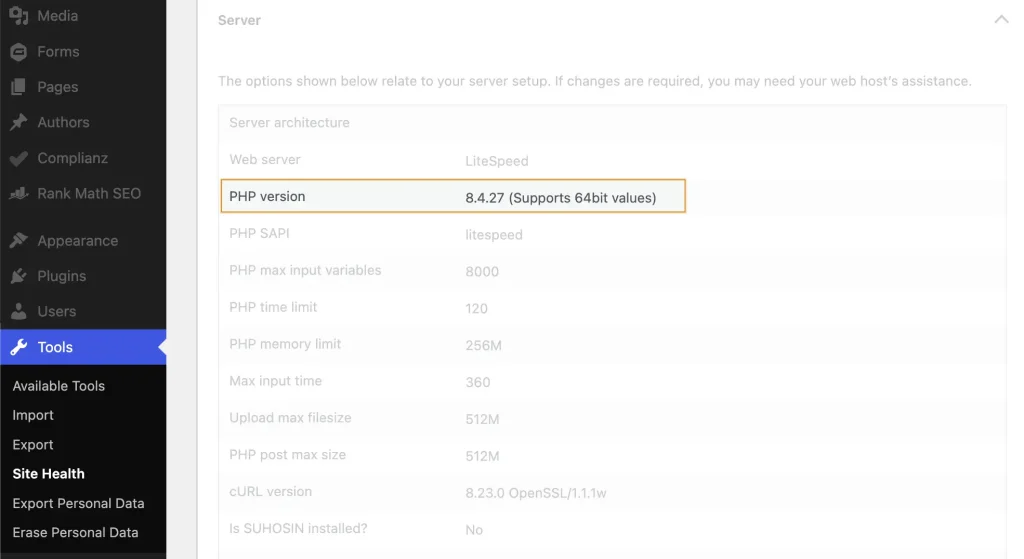
First, log into your WordPress dashboard and go to: Tools → Site Health → Info → Server
Look for PHP version.
The security fixes were released in the following versions on 21 October 2026:
- PHP 8.5.12
- PHP 8.4.27
- PHP 8.3.36
- PHP 8.2.35
If you’re using one of these versions (or a newer release within the same PHP branch), the fixes should be included.
Important: If your website is running PHP 8.1 or older, it’s worth planning an upgrade either way. These versions no longer receive regular security updates from the official PHP project.
Make sure you first have a full backup and check that your website, theme and plugins are compatible before making any changes.
2. Check with your hosting provider
If your PHP version is older than the patched versions listed above, don’t panic just yet.
Some hosting providers have applied the security patches directly to their servers without changing the PHP version number displayed in WordPress (known as backporting).
Check your emails or hosting dashboard for any announcements about the October PHP security update.
If you can’t find anything, contact your hosting provider and ask:
“Hi! Can you confirm whether the emergency PHP security patches released on 21 October 2026 have been applied to my hosting, or whether I need to do anything? Thanks!”
Your provider should be able to confirm whether your website is protected or if further action is needed.
3. What if my website hasn’t been updated?
If your hosting provider confirms that the security patches haven’t been applied, ask them to apply them as soon as possible.
Before upgrading PHP, it’s important to check that your website, theme and plugins are compatible with the newer version, as older software can sometimes cause issues. Make sure you get a full backup first, just in case.
Given the severity of these vulnerabilities, though, this isn’t one to leave sitting on your to-do list, as tempting as it might be!
What about websites hosted with Healthy Pixels?
Following the security announcement, any websites hosted by Healthy Pixels were thoroughly checked.
Luckily, the hosting provider used for most of our sites applied the security patches within 24 hours, with no further action needed for those sites, which really demonstrates the importance of a good host.
It’s a good reminder that website maintenance goes beyond keeping WordPress and its plugins updated.
Need a hand checking your website?
If you’re looking at your WordPress dashboard wondering what on earth you’re supposed to be checking, feel free to get in touch.
I’m more than happy to have a quick look and help you work out whether your website needs any attention. No strings attached.
Get in Touch